
TL;DR:
- Wedding photographs are irreplaceable memories that require proper backup to ensure their longevity.
- Implementing the 3-2-1-1-0 backup rule, including offsite and offline copies, protects against digital and physical disasters.
- Couples should regularly verify their backups and follow disciplined workflows to preserve their wedding day legacy effectively.
Your wedding photographs are not simply files on a drive. They are the visual record of one of the most profound days of your life, capturing the glance exchanged at the altar, the tears of a parent, the intricate embroidery of a lehenga caught in afternoon light. Understanding why backup wedding photos matter is the first step towards protecting those memories with the same care and intention you brought to every other detail of your wedding. Yet most couples, in the joy and exhaustion of newlywed life, overlook this entirely.
Table of Contents
- Key takeaways
- Why backup wedding photos matter
- The 3-2-1 rule and its modern evolution
- Practical backup solutions for couples
- Common mistakes couples make with photo storage
- My perspective on why this truly matters
- Protect your memories with Rashpal-photography
- FAQ
Key takeaways
| Point | Details |
|---|---|
| Backup differs from redundancy | RAID and mirrored drives protect against hardware failure but cannot replace true, independent backups. |
| Follow the 3-2-1 rule | Keep three copies of your photos across two media types, with at least one stored offsite. |
| Cloud storage is affordable | Services such as Backblaze offer unlimited offsite backup for approximately $9 per month. |
| Verify your backups regularly | A backup you have never tested is not a backup. Restore a sample file periodically to confirm integrity. |
| Protect against ransomware | At least one copy should be offline or air-gapped, completely disconnected from your network. |
Why backup wedding photos matter
Many couples assume that because their photographer delivered a USB drive and a download link, their photos are safe. Others believe that copying their images onto two hard drives at home constitutes a solid backup strategy. Neither assumption holds up when reality intervenes.
The distinction between a backup and redundancy is one of the most misunderstood concepts in digital storage, and it matters enormously here. Redundancy, such as a RAID array, means two drives mirror each other simultaneously. If one drive fails mechanically, the other takes over. It sounds reassuring. The problem is that RAID is not a backup in any meaningful sense of the word.
Here is why. Consider what RAID cannot protect you against:
- Accidental deletion. If you or your photographer accidentally delete a folder, both mirrored drives lose those files immediately.
- File corruption. A corrupted file on one drive propagates instantly to its mirror.
- Ransomware. Malware that encrypts your files will encrypt both drives simultaneously if they are connected to the same system.
- Physical disaster. A house fire, flood, or theft removes both drives in a single event.
RAID provides high availability but cannot protect against deletion, corruption, or physical disasters, which means it needs to be paired with at least one offsite copy for full data protection. This is not a technical nuance. It is the difference between your children one day seeing your wedding portraits and them never knowing what your first dance looked like.
The importance of wedding photo backup goes beyond hardware. It is about removing every single point of failure from the one set of images you can never recreate.
Pro Tip: Ask your photographer directly how many copies of your files they hold, where those copies are stored geographically, and how long they retain them. A professional with a disciplined workflow will answer this immediately and in detail.
The 3-2-1 rule and its modern evolution
Once you understand why a single drive or a mirrored pair is insufficient, the solution becomes far clearer. The gold standard in data protection is the 3-2-1 backup rule, a model that has guided professional archivists and photographers for years.
The framework is elegantly simple:
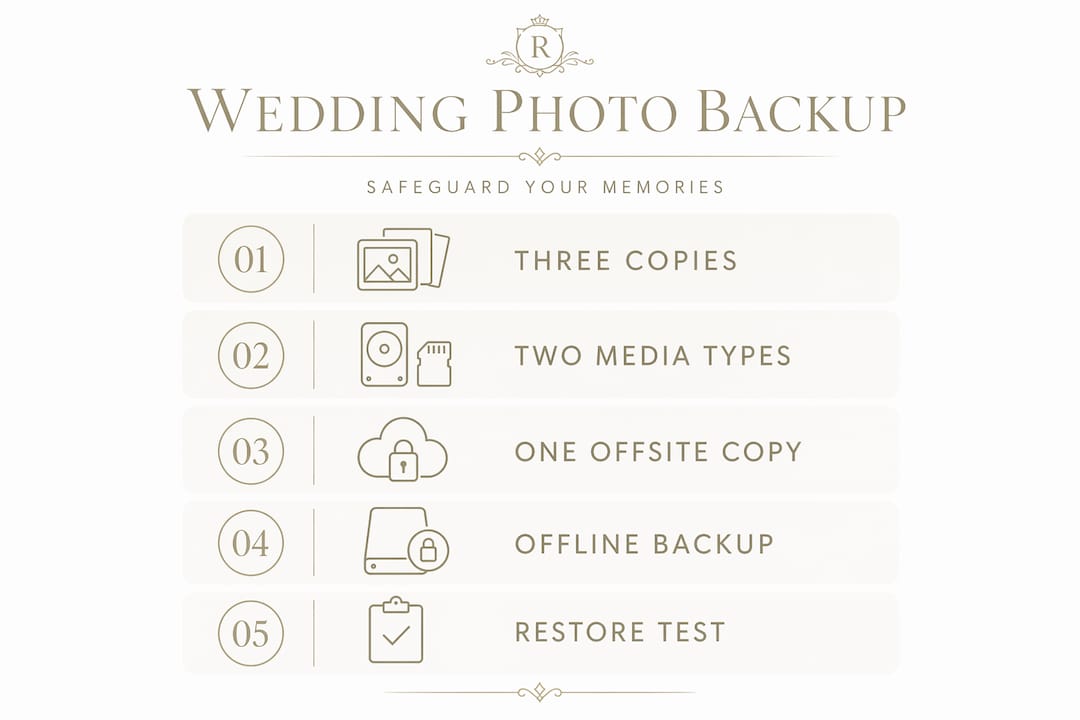
- Three copies of your photos in total
- Two different media types (for example, an external hard drive and a cloud service)
- One copy stored offsite, physically separated from your home
For wedding photos specifically, a practical interpretation might look like this: your photographer's archive counts as one copy, an external drive at home counts as a second, and a cloud service counts as your offsite third.
However, the modern threat of ransomware has pushed the industry towards a more evolved framework. The 3-2-1-1-0 backup rule adds two critical refinements. The first additional "1" requires that at least one copy be offline or air-gapped, meaning it is completely disconnected from any network and therefore unreachable by malware. The final "0" means zero errors on restore: your backups must be verified and confirmed as recoverable, not merely assumed to be so.
| Rule | Copies | Media types | Offsite copy | Offline copy | Verified restore |
|---|---|---|---|---|---|
| 3-2-1 | 3 | 2 | Yes | No requirement | No requirement |
| 3-2-1-1-0 | 3 | 2 | Yes | Yes | Yes (zero errors) |
Geographic dispersion matters more than couples realise. Storing one drive at home and one at your parents' house in a different city gives you meaningful protection against localised disasters. Offsite backups are the ultimate fail-safe against physical threats including fire, theft, and flooding, and immediate offsite synchronisation reduces the window of vulnerability between when photos are captured and when they are safely archived.
Pro Tip: Do not think of your wedding photos as data. Think of them as physical objects of irreplaceable value, like a handwritten letter from a grandparent. You would not keep only one copy of something like that.
Practical backup solutions for couples
The good news is that protecting your wedding memories does not require a technical background or significant expense. The following steps will take you from vulnerable to well-protected within an afternoon.
- Download everything immediately. As soon as your photographer delivers your gallery, download the full-resolution files before doing anything else. Do not rely on a third-party gallery platform indefinitely.
- Copy to an external hard drive. Purchase a reputable external drive of at least 2TB, which offers ample space for high-resolution wedding images and costs very little. Store this at home in a safe location.
- Create a second local copy on a different device or USB. A second external drive or a large USB stored at a relative's home provides your second physical copy on a different medium.
- Set up cloud backup. Cloud backup services such as Backblaze offer unlimited personal backup for approximately $9 per month, making offsite storage genuinely accessible for any budget.
- Label and organise your files clearly. Use a consistent naming convention such as "Wedding_[Date]_[Photographer]" so that files remain traceable and searchable years from now.
- Test your restore process. Copy a sample of files from your backup back onto your computer to confirm they open correctly and have not been corrupted.
Beyond the individual steps, it is worth understanding how professional photographers approach this. Professional wedding photographers follow disciplined workflows that include immediate dual card recording during the shoot, triplicate backups during transit from venue to studio, and long-term archiving across both a NAS system and cloud storage. Their methodology turns potential technical disasters into minor inconveniences precisely because no single point of failure exists anywhere in the chain.
A professional backup workflow involves multiple backup tiers: fast local copies for working access, slower archival storage for long-term retention, and offline air-gapped media as the final defence against ransomware. You can mirror this approach at home with very little effort.
Industry best practice also suggests keeping RAW files for at least 24 months and final edited JPEGs indefinitely, treating them as permanent archival assets rather than temporary files to be cleared when storage runs low.
Why your wedding day timeline matters for photography also informs backup priorities. The more complex and extended your day, the larger the volume of files your photographer will generate, and the more robust your combined backup strategy needs to be.
Common mistakes couples make with photo storage
Understanding the benefits of backing up wedding photos is one thing. Recognising the specific ways couples undermine their own efforts is equally important. These are the pitfalls that appear most frequently, even among well-intentioned newlyweds.
- Treating the gallery link as the archive. Online gallery platforms are delivery tools, not permanent storage. Services close, subscriptions expire, and links break. Your downloaded files are your archive.
- Assuming RAID means safe. As established, RAID is often misunderstood and misused as a backup, creating a false sense of security that leads to irreversible data loss when accidental deletion or malware strikes.
- Never verifying backup integrity. Testing backup restores periodically is critical for wedding photo archives. A backup that has never been tested cannot be trusted when it is needed most.
- Storing all copies in the same location. Two drives in the same room are not meaningfully different from one. Geographic separation is the entire point of offsite storage.
- Neglecting to update backups after edits. If you receive additional edited images or albums months after your wedding, those new files must be added to every copy in your backup chain, not just the most convenient one.
The emotional dimension of these mistakes is worth stating plainly. Losing wedding photos is not equivalent to losing a downloaded film or a work spreadsheet. It is the loss of the moments that surrounded your vows, the last photographs taken with people who may no longer be with you, and the visual inheritance you would one day pass to your children. No amount of regret retrieves those images once they are gone.
Pro Tip: Set a calendar reminder for six months after your wedding to verify all your backup copies still open correctly and that your cloud subscription remains active. Treat it as routine maintenance for something precious.
My perspective on why this truly matters
I have photographed weddings for many years, and the question I am asked less often than I should be is: what happens to the photos after you deliver them? Couples invest deeply in photography and then, quite understandably, turn their attention to married life.
What I have seen, on rare but devastating occasions, is the consequence of that shift in focus. A drive that failed two years after the wedding. A gallery link that expired without warning. A laptop stolen on holiday that contained the only copies a couple had saved. These are not hypothetical scenarios. They are real, and the grief attached to them is disproportionate to what most people imagine data loss feels like.

In my experience, protecting wedding memories is not a technical task. It is an act of care for the story of your own life. The images I create are designed to feel timeless and cinematic, to carry the emotion of your day with the same weight decades from now as they do in the week after your wedding. But that timeless quality only survives if the files survive.
My honest advice is this: treat your photo backup with the same seriousness you gave your venue booking or your guest list. Build a simple system within a fortnight of receiving your gallery, test it once, and then check it annually. It takes one afternoon and costs very little. The alternative is a risk no couple should be willing to accept, not for something as singular and irreplaceable as this.
— Rashpal
Protect your memories with Rashpal-photography

At Rashpal-photography, every couple's gallery is handled with a professional-grade commitment to preservation from the moment the shutter fires. Wedding days for Asian ceremonies and cultural celebrations often span multiple locations, rituals, and emotional peaks, generating hundreds of breathtaking images that deserve nothing less than meticulous safekeeping. Each package includes a disciplined backup workflow, so your photographs are protected long before they reach your hands.
Whether you are drawn to the intimate scope of The Minimalist Investment or the sweeping, cinematic coverage of a full-day Classic Investment package, every option is built around the understanding that your images are a legacy. Reach out today to discuss how Rashpal-photography can both create and help you preserve the timeless portraits your wedding day deserves.
FAQ
What does the 3-2-1 backup rule mean for wedding photos?
The 3-2-1 rule means keeping three copies of your photos across two different media types, with at least one copy stored offsite, such as in cloud storage. For wedding photos, this might mean your photographer's archive, a home hard drive, and a cloud service like Backblaze.
Is RAID sufficient to protect my wedding photos?
No. RAID cannot protect against accidental deletion, file corruption, ransomware, or physical disasters such as fire or theft. It should only ever be used alongside, not instead of, independent offsite backups.
How long should I keep my wedding photo files?
Best practice recommends keeping final edited JPEGs indefinitely and any RAW files for at least 24 months, treating your wedding images as permanent archival assets rather than temporary files.
How do I know if my backup is actually working?
Testing backup restores by copying files back onto your computer and confirming they open correctly is the only reliable way to verify a backup. A backup that has never been tested cannot be trusted in a genuine recovery situation.
What is the safest cloud service for wedding photo storage?
Services such as Backblaze offer unlimited personal backup for approximately $9 per month, making them both affordable and practical for offsite archiving of high-resolution wedding images.
Recommended
- How The Right Photography Can Make Or Break An Asian Wedding Rashpal Photography | Wedding Photographer Uxbridge, UK
- Common Mistakes Made By Amateur Wedding Photographers Rashpal Photography | Wedding Photographer Uxbridge, UK
- How to Pose for Perfect Wedding Photos Rashpal Photography | Wedding Photographer Uxbridge, UK
- Top Tips For Camera Shy Couples Rashpal Photography | Wedding Photographer Uxbridge, UK